Release notes

A little better, every release.

New features, small improvements, and the fixes that make your day smoother.

Latest release

0.14.1

View on GitHub

Fixed

  • A sleeping tab woken by resting the pointer on it no longer shows a loading spinner in the sidebar until it is opened.

0.14.0

View on GitHub

Bring anything into your sidebar.

Drop links and files right where you want them, and a page's dialogs now stay in their own tab.

Drop it where it goes.

Drag a link, an address or a file from another app onto the sidebar: between two tabs, into a folder or onto a tab.

Dialogs that stay in their tab.

A page's alert or sign-in covers only its tab, so the rest of Lilo stays usable while it waits.

All changes in this release

Added

  • The print panel has Print backgrounds and Print headers and footers options, remembered for the next print, and printed footers number each page.
  • The find bar shows which match is selected among all of them, as in "3 of 12".
  • A page that announces the next page with speculation rules now gets it prefetched, as in Chrome, so it opens sooner.
  • Opening a local folder, such as file:///Users/, lists its files and subfolders with their size and date modified, sortable by column.
  • Dropping a link, an address or a file from another app on the sidebar opens it: between two tabs as a new tab there, in a folder at its end, on a tab in that tab.
  • A sleeping tab starts loading as soon as the pointer rests on it in the sidebar or the tab strip, so it is ready sooner after the click; it goes back to sleep if it is not opened.

Changed

  • A site's username and password prompt saves them only when you tick Remember this password. Saved ones belong to the profile and go when you clear its cookies or delete it.
  • Background tabs of sites allowed to show notifications, such as mail and chat apps, are no longer frozen when idle, so their notifications keep arriving.
  • Zooming in and out steps through the same levels as Chrome, from 25% to 500%, and works on pages without a site address, such as page source and local files.
  • In the top tab strip, the back button sits closer to the window buttons.
  • When the top tab strip runs out of room, the Space button shrinks to its icon before the tabs start scrolling.
  • Background tabs connected to a peer, such as a web chat or an online game, or holding a lock other tabs may wait on, are no longer frozen when idle.
  • Pages keep far more of what they load in the cache (up to 1 GB, as Safari, instead of 75 MB): coming back to a site downloads less.
  • Coming back to a site opens the connections its pages need while the page itself is still loading, as Chrome does: images and fonts from other servers show sooner.

Fixed

  • A Picture in Picture call window closes when its page crashes, instead of staying open and blank.
  • Find Next and Find Previous search for the text last used for find in any app, as in Safari, and are greyed out when there is nothing to find.
  • Pasting copied files in a terminal types their paths, as dropping them does.
  • Typing a download link into a new tab no longer closes that tab once the download starts.
  • Shortcuts typed with Shift on a symbol key, such as Shift-Command-2 to capture an area or Arc's Control-Shift-Equals for a split view, work.
  • Two downloads of files with the same name started together no longer write to the same file.
  • Resuming or retrying a download no longer uses the cookies of a private space or profile it was not started in.
  • Web apps get Lilo's shortcuts first, as in Chrome: Command-[ indents in Google Docs, Command-P opens files in VS Code for the web and Command-F opens a site's own search. Lilo runs the shortcut when the page does not use it; opening, closing and switching tabs, windows and spaces, and Command-L, stay with Lilo.
  • Shift-clicking a link no longer closes a window a page opened as a peek: only an earlier link peek closes.
  • Links to other apps (Zoom, Slack and the like) in a popup or Little window ask to open the app instead of doing nothing.
  • On a terminal tab, Command-[, Command-], Command-P and Command-S are no longer swallowed by page actions that do nothing there.
  • Command-clicking or middle-clicking a download link downloads the file instead of opening an empty tab.
  • Saving a file a page generates, such as a PDF from the viewer, now asks where to save it when that setting is on and applies extension filename suggestions.
  • Command-clicking or middle-clicking a link inside an embedded frame opens it in a new tab instead of changing the frame.
  • Embedded widgets (payment, sign-in, share) can open their window a few seconds after your click, as in Chrome; each click allows one such window.
  • A window a page opens in an agent's tab stays linked to that page, so sign-in popups and forms that post to a new window work for agents.
  • Signing in from a pinned or bookmarked tab through another site returns to the tab: once the peek comes back to the tab's own site, the tab takes the page.
  • The update card fits a narrow sidebar: the app icon steps aside and a long version no longer spills out of the card.
  • Restarting for an update now checks for a newer release right away, so a version published while the update waited arrives without waiting for the next scheduled check.
  • An extension that registers its content scripts again on install, like a meeting transcriber, no longer fails with a duplicate script error.
  • Importing from Chrome no longer turns cookies a site set inside other sites into its own cookies, which could sign you out of it.
  • A download whose name is taken keeps a double extension together, as in archive (1).tar.gz.
  • Downloading an image or a linked file from the context menu of a secure page no longer tells an insecure (http) address which site it came from.
  • A window showing a private Space no longer comes back as an extra window when Lilo relaunches.
  • Clearing browsing history also clears the pages under Recently Closed, so Reopen Closed Tab no longer brings them back.
  • A page's alert, confirm and prompt dialogs say which site is asking, and a frame embedded in the page is named as such.
  • A page that keeps opening alerts no longer traps its window: from its second dialog on, you can stop the page from showing more.
  • With a Peek open, Back, Forward, Reload, Stop, Find and Print act on the Peek instead of the tab hidden under it.
  • Deleting a profile now also deletes its cookies, sign-ins and site data from disk.
  • Reopen Closed Tab brings the page back with its back and forward history, as in Chrome.
  • Clearing browsing data from a private space now clears the profile's cookies, cache and site data, not only the private session's.
  • Duplicate Tab keeps the page's back and forward history instead of loading it fresh.
  • A tab opened from a link now sits right after its page, in the page's folder, with several links kept in the order they were opened.
  • Closing a background tab whose page has unsaved changes shows the tab and asks before leaving, instead of losing the changes.
  • Quitting keeps the back and forward history of every tab whose page is still open, not only the current one.
  • After a crash, a tab no longer reopens on a page older than the one shown in the sidebar.
  • Extensions that group tabs of a Space in the background now group them there, instead of leaving an empty group in the Space on screen.
  • Sites can store as much offline data in Lilo as in Safari, instead of hitting a storage limit four times lower.
  • Cancelling the certificate choice for a site loads it without a certificate instead of stopping the load, and a certificate chosen in one profile or private space is no longer used in another.
  • A tab an extension opens in a Space in the background now opens in that Space, and an extension not allowed in private Spaces never opens one in the private Space on screen.
  • A window an extension opens no longer shares the private Space on screen, and one it opens as incognito is now private.
  • An extension's proxy now also carries that extension's own signed-in requests and its background WebSockets, which went out directly.
  • Closing the command bar or the find bar with Escape, or loading an address in the current tab, gives the keyboard back to the page, so Space and the arrow keys scroll it again.
  • Settings, Downloads, Clear Browsing Data, Extensions and the Process Manager take the keyboard when opened from their shortcuts, so Escape, Tab and typing reach them instead of the page.
  • A download lands in the list of the profile it was made in, and each window lists only the downloads of the profile it shows, even with windows on different profiles.
  • Location and notifications work on local development sites such as app.localhost, any 127.x.x.x address and local files.
  • A download retried from the start, and View Source, send the browser's user agent instead of a system one, so sites that check it serve them as they serve the page.
  • A cross-origin frame, such as an ad, can no longer ask for your location unless its page allows it, and never for notifications; a frame's request is asked and remembered under the page's site.
  • Site permissions (camera, microphone, location, notifications, external apps) belong to each profile instead of being shared by all; existing decisions are kept in every profile.
  • Notification.permission reads "denied" on a site whose notifications are blocked, so its button to turn them on no longer shows for nothing.
  • A private space no longer gets the camera, microphone or location a site was allowed in normal browsing: it keeps only blocks, remembers its own answers until it closes, and never shows notifications.
  • Revoking or blocking a site's camera, microphone or location in Settings stops what its open pages are using right away, as Chrome does.
  • Cancelling a download, or removing a failed one from the list, deletes the partial file it left in the Downloads folder, and retrying it keeps the original file name.
  • Downloaded files show where they came from in the Finder's Get Info, as with Chrome and Safari, except for downloads from a private Space.
  • The tab bar above or below the page no longer scrolls back to the current tab when another tab's title or loading progress changes.
  • Escape reaches the page before it stops a load, as in Chrome, so a dialog on a page still loading closes with it.
  • Backspace in the command bar removes the suggested completion first, keeping the letters you typed.
  • Removing a history entry from the command bar's history scope takes its row off the list right away.
  • AppleScript and Shortcuts no longer see or close the tabs of a locked folder.
  • Links from other apps and new Little windows no longer open in a private space shown in the front window: they go to the last regular space.
  • A link a Little window opens in a new tab opens in another Little window, instead of a hidden tab of the window behind.
  • Closing a browser window keeps its Little windows open: another window takes them over, and the last one hides instead of quitting Lilo.
  • The address bar opens addresses with accented or non-Latin names, mailto: and data: links, and searches for names like node.js or package.json instead of trying to open them.
  • A page can share its own tab when it asks for it (preferCurrentTab or selfBrowserSurface), as in Chrome.
  • A refused Picture in Picture request from a page no longer closes the Picture in Picture window it already has open.
  • Removing an agent also removes the profiles it was allowed into: connected again, it has to ask for them again.
  • A setting changed in one window, such as the search engine or the language, now applies to every open window at once.
  • The Language setting says that menus and dialogs switch language when Lilo restarts.
  • Shortening the folder auto-lock delay applies to folders already unlocked.
  • Connecting an agent keeps a symlinked MCP configuration file a link, and keeps the file's permissions.
  • The keyboard focus ring of a download row is clearly visible.
  • A local HTML page shows images, styles and scripts from other folders, such as ../style.css in generated documentation.
  • A background tab freezes or sleeps once it has been left alone long enough, counted from when you left it rather than from when you opened it, and never while its page is still loading.
  • Video and audio that were playing without sound when a background tab froze, such as a muted live stream or a looping background video, play again when you return to the tab.
  • Leaving Lilo pops out a video in Picture in Picture only when it plays with sound, not a muted or paused video of a page whose sound comes from elsewhere.
  • Reader text size, theme and width are kept by Lilo for every site instead of in each site's storage, where the site could read them.
  • A translated page keeps translating text it adds later, such as new posts in a feed or a new route, and leaves text inside code blocks and graphics untranslated.
  • "Always allow" for opening an app now covers that app's links only, and the frame that asked rather than the whole page; earlier "Always allow" answers for apps are asked again.
  • Actual Size returns a page to your default zoom instead of 100%, and a site set to 100% keeps that level when your default zoom is different.
  • "Reload without blocker" on a page that stopped responding reloads it once the blocker is off for the site, instead of reloading it with the blocker still on.
  • A page's zoom in a private space stays as you set it when you switch tabs or browse the same site, kept in memory only and starting from your profile's levels.
  • A link dragged onto a page reaches the page: only a narrow strip at a pane's left or right edge offers a split view, and never for a link dragged out of a page.
  • Show Reader on a page that is not an article leaves the page as it is and beeps, instead of switching the menu to Hide Reader and reloading the page on the next press.
  • Save Page As on a PDF, an image or another file shown as is saves the original file under its own name, instead of a web archive or a re-rendered PDF.
  • When a page sends you to another address, the address bar keeps showing the page you are on until the new one appears, so a page can no longer show another site's address over its own content.
  • Content blocker filters ending in ^ also match a URL that ends there, so their blocks and the exceptions that repair sites apply again.
  • A content blocker filter without a type no longer blocks the page you open itself, only its frames and resources, as in uBlock Origin.
  • A page can no longer open the source view of another page; only you can, with View Page Source.
  • Right-clicking a link, an image or video, selected text or a text field no longer offers Back, Forward, Reload and the other page items, as in Chrome.
  • A page whose connection drops while it loads keeps showing what it loaded, instead of an error page over it.
  • VoiceOver reaches the address bar's buttons (site controls, ad blocker, screenshot, copy link) instead of reading the bar as one button.
  • VoiceOver announces an error page when a page fails to load.
  • Find in page no longer drops the spaces around a search, so "cat " skips "category".
  • Closing the find bar keeps the search, so Find Next goes on with it and the next Find opens with it selected.
  • Following a link or reloading closes the find bar, as in Chrome; one opened while the page loads stays, cleared for the new page.
  • Reloading a page a form sent asks before sending the form again, as Chrome does, and a page a form sent is no longer sent again on its own after it stops responding.
  • Back on an error page returns to the page you were on, instead of the one before it.
  • An extension with nothing to do no longer stays running while you switch between tabs, so it stops using energy in the background.
  • The address card says "Not secure" instead of "Encrypted" on a page you visited despite a certificate error, or that loaded part of its content without encryption.
  • A very long site address no longer spills out of the active tab over its neighbors in the tab strip.
  • An accepted certificate warning now holds in every window of its profile, until you quit, and for every request to that site, while a private Space keeps its own and forgets them when it closes.
  • A page without a title, such as a text file or an image, shows its address once loaded instead of the previous page's title, also as a pinned tab's home title.
  • History records a page as soon as it shows, and the pages a site opens without loading a new document (its routes, its anchors), as Chrome does.
  • A title a page sets just after loading, as web apps do, now names its history entry.
  • The Spaces menu of the tab strip, the command bar and the Spaces menu now show the agents' mascot for an Agents space, name its profile, and leave out the Agents spaces no agent uses, as the sidebar does.
  • Search with Google in a page's context menu now searches in a new Lilo tab with your default search engine, and names that engine, instead of opening another browser.
  • Closing Settings or another panel hides the sidebar again when it was hidden before the panel opened.
  • Deleting a folder, or a new agent clearing a past agent's folder, no longer leaves the page of a tab it held on screen.
  • A certificate error on a site that requires a secure connection (HSTS preload list, such as .app and .dev sites) no longer offers Visit Anyway, as in Chrome.
  • The Site drawer's camera and microphone choices fit the sidebar: each is a pop-up menu with Ask, Allow and Block.
  • The content blocker now hides page elements with styles a page can neither see nor remove, so ads a site forces back into view with its own styles stay hidden.
  • A page's alert, confirm, prompt or sign-in covers only its own tab: the sidebar, the address bar and other tabs stay usable, what was typed is kept while switching away, and closing or leaving the tab answers it.
  • Downloading an image or a linked file from the context menu now follows the page's referrer policy, as Chrome does: a page or frame that sends no referrer, or a link marked noreferrer, no longer tells the download's server where it came from.

0.13.1

View on GitHub

Changed

  • The About window shows Lilo's tagline in your language, with links to the website and GitHub.

Fixed

  • In a Space with no tabs open, clicking New Tab or pressing Command-T brings the command bar back after you close it, and the New Tab row no longer shows a close button that does nothing.
  • Files a site sends as a download, such as a Google Docs export to PDF, are downloaded instead of loading invisibly in the page.
  • Command-Shift-V pastes without formatting, as in Chrome and as Google Docs suggests, alongside Option-Shift-Command-V.
  • File pickers only offer the types a site accepts, such as images for a photo upload.
  • A page that prints from a frame, like a receipt or a shipping label, prints that frame instead of the whole page.
  • Escape stops a page that is loading, as in Chrome and Safari.
  • Command-E searches for the selected text, as in Safari, and Find Next goes on from it.
  • Retrying a download that cannot resume sends the site's cookies, so a download that needs you signed in can finish.

0.13.0

View on GitHub

Lilo dresses up for the holidays.

The app icon picks up a festive touch on special days, drawn for each icon.

An icon for every season.

Halloween, Christmas, Lunar New Year, Easter and a few other days each get their own version of your icon. Turn it off in Settings > Appearance.

All changes in this release

Added

  • Lilo's app icon dresses up for Halloween, Christmas, New Year, Valentine's Day, Lunar New Year, Easter, the summer solstice and its own birthday, in a version drawn for each icon. Turn it off in Settings > Appearance > Seasonal icon.

Fixed

  • With the address above the page, an extension's side panel fills the window's height beside the page instead of starting under the bar.
  • In a split, the bar above the page takes the color of the pane you focus, matching its address field.
  • A site an extension shows inside its pages keeps the cookies it sets, so it stays signed in instead of failing a moment later.
  • On a site with a sticky header, such as X, the bar above the page takes the header's color instead of a dark one the site declares over a light page.
  • A site an extension shows inside its pages gets its cookies on its live connections too, so answers it streams over a WebSocket arrive.
  • A site an extension shows inside its side panel loads again instead of being stopped by a security check.
  • A site an extension frames in its side panel, an offscreen document or a tab can run the workers its own security policy allows, so a chat assistant's side panel gets its answers again.

0.12.0

View on GitHub

The bar becomes the page.

The bar above the page now takes each site's color and moves with it, as one card.

Blends into every site.

With the address above the page or the tabs on top, the bar takes the site's color, gradients included, and slides with the page.

All changes in this release

Added

  • With Lilo's developer tools unlocked, Safari's Develop menu lists each extension's background and side panel, so you can inspect them.

Changed

  • Lilo checks for updates every hour instead of once a day, so the card offering to restart into a new version shows up soon after a release.
  • When a call page offers no microphone or camera control of its own, such as Google Meet, the call card says its button mutes in Lilo: the page's own button does not follow it.
  • The edge between the page and an extension's side panel lights up in the Space's color when you point at it, as the sidebar's edge does.
  • The bar above the page, or the tabs on top, takes the site's color, gradients and images included, and slides with the page as one card. The window keeps a border all around, the traffic lights stay in the same place in every layout, and with the sidebar on the left its toggle sits just before the back arrow.

Fixed

  • A call's picture-in-picture window docked in the sidebar, such as Google Meet's, keeps its shape and shows all its controls instead of being cropped.
  • A site an extension shows inside its side panel or pages gets its own cookies, as in Chrome, so it no longer loads signed out.
  • The recently archived tabs menu shows each site's favicon instead of a letter.
  • A site an extension shows inside its popup or an offscreen document gets its own cookies too, so it no longer loads signed out.
  • A site an extension shows in its side panel keeps the local storage it has in your tabs, instead of starting empty on every load.

0.11.1

View on GitHub

Changed

  • Screen, window and tab shares stay sharp and move at up to 30 frames per second in Google Meet calls, instead of 5.
  • The Agents space shows its mascot next to its name at the top of the sidebar, instead of a robot emoji.
  • A private space an agent opens for its isolated tabs shows a ghost of its mascot instead of sunglasses.
  • Sharing a screen or window in a call stays sharp on a Retina screen and smooth at 24 frames per second on every site, for far less CPU than before.
  • The call card shows when you share your screen or a window, with a button to stop sharing.
  • Background tabs stay loaded much longer: they are paused instead of unloaded when the window is hidden, each other space keeps its recently used tabs, tabs with unsaved form input are never unloaded, and the Balanced setting unloads tabs only when memory runs low.

Fixed

  • A Space made of grain shows its grain around the page too, not only on the sidebar.
  • With scroll bars always shown, a category in the emoji picker scrolls to its own emoji instead of a section above it.
  • A call keeps running at full speed when you leave its tab or Lilo, so a screen share or a big Google Meet call no longer slows down in the background.
  • Pages an AI agent drives in the background run their timers at full speed, so what the agent measures there matches a page you are looking at.
  • Google Meet no longer sees everyone speaking at full volume: its speaking indicators calm down and a call with several people uses less CPU.

0.11.0

View on GitHub

Make each Space your own.

Glass, grain, and colors that follow your sites, your wallpaper or the time of day.

Glass, grain or solid.

Pick each Space's material on its window preview in Appearance: Liquid Glass tinted with its color, or a fine film grain.

Colors that follow you.

Take the color of the site you're on or of your wallpaper, or let your color warm up in the evening.

All changes in this release

Added

  • Each Space can be made of glass, with Liquid Glass tinted by its color, or of grain, its color under a fine film grain: pick it on the window preview under Appearance, in the Space editor or during setup.
  • Picture in picture also opens when you switch to another app while a video plays, and closes when you come back to Lilo, as when you leave and return to its tab.

Changed

  • Capturing a selected area no longer adds anything to the page that a site could detect, and Escape cancels it wherever keyboard focus is.
  • Closing find in page leaves the last match selected, as in Safari, instead of clearing the selection. Opening find with text selected in a text field or a frame now fills in that text too, and, outside private spaces, shares it with other apps' Find like Use Selection for Find.

Fixed

  • Restart on the update card installs the update and relaunches Lilo instead of spinning forever, and its close button hides the card again.
  • A mouse's back and forward buttons, like those of a Logitech MX or M series mouse, now go back and forward in the tab's history.
  • Middle-clicking a tab in the sidebar closes it, as in the tab bar.
  • Cmd-Shift-clicking a link opens it in a new tab in front, Cmd-clicking or middle-clicking Back or Forward opens that page in a new tab, Option-clicking a link downloads it, and Cmd-Left and Cmd-Right go back and forward outside text fields, as in Safari and Chrome.
  • A site that asks for a client certificate now works, Lilo shows the certificates from your keychain to choose from, as Safari does.
  • The card a screenshot leaves at the bottom of the page takes clicks again, so its Edit, Save and close buttons work.
  • The Agents Space's tooltip shows the agents' mascot instead of a robot.
  • The return button of a video's picture in picture window brings its tab back when the tab is in another Space.
  • A video in Picture in Picture stays open when paused, instead of closing after a few minutes in the background.
  • The recently archived tabs menu is no longer clipped by the sidebar and stays within the window.
  • Extension side panels and their resize handles are now visible instead of being hidden behind the window frame.

0.10.1

View on GitHub

Fixed

  • Middle-clicking or Cmd-clicking something a site opens on its own, like X's trending list, now opens it in a background tab, as in Chrome.
  • A page can open a window a few seconds after a click, as in Chrome, so buttons like Google Meet's chat with a guest open their window.

0.10.0

View on GitHub

A fresh start, nothing lost.

After a long break, Lilo opens on a clean window, and the tabs it archived meanwhile are one click away.

Come back to a clean window.

After a long enough absence, Lilo opens with no tab selected, and your pinned and bookmarked tabs back on their home page. The tabs it archived meanwhile come back with Undo. Turn on Open to an empty window to start this way at every launch.

Archived tabs, one click away.

The tabs Lilo archived in the last day wait next to New Tab, or in the tab bar, ready to come back in one click.

All changes in this release

Added

  • After a long enough absence, Lilo opens on a clean window: no tab selected, pinned and bookmarked tabs back on their home page, and the tabs it archived meanwhile offered back with Undo. The new Open to an empty window setting does this on every launch.
  • The tabs Lilo archived in the last day wait next to New Tab, or in the tab bar, ready to come back in one click.

Fixed

  • With the tabs at the top or bottom, the History page shows as the active tab with its own close button, as Settings does.
  • Middle-clicking or Cmd-clicking a link that opens in a new tab now opens that tab in the background.
  • A tab whose page hangs no longer keeps a process spinning once closed, nor for long in the background, and no longer blocks the next pages of the same site.
  • The picture-in-picture back button brings Lilo to the front from another app, a call in Meet's companion mode floats when you switch apps, and Meet's picture-in-picture opens even when Meet is slow to answer.

0.9.0

View on GitHub

Find your way back.

Your whole history is one shortcut away, calls stay in view when you leave their tab, and Lilo now speaks eight more languages.

Your whole history, day by day.

Press ⌘Y to open the History page. Each day's visits are grouped by site, so a busy afternoon reads in a few lines. Filter by period, site or the terminal that opened a page, search, and delete what you pick.

Keep your call in view.

Leave a Google Meet tab and its compact view follows you: in the sidebar while Lilo is in front, in a floating window over your other apps. Speaker, mute, camera and hang up stay one click away.

Lilo speaks your language.

German, Japanese, Italian, Korean, Traditional Chinese, Polish, Turkish and Dutch join the list, from the menus to system prompts, Shortcuts and emoji search.

All changes in this release

Added

  • Use Lilo in German, including menus, system prompts, Shortcuts, and emoji search.
  • Use Lilo in Japanese, including menus, system prompts, Shortcuts, and emoji search.
  • Use Lilo in Italian, including menus, system prompts, Shortcuts, and emoji search.
  • Use Lilo in Korean, including menus, system prompts, Shortcuts, and emoji search.
  • Use Lilo in Traditional Chinese, including menus, system prompts, Shortcuts, and emoji search.
  • Use Lilo in Polish, including menus, system prompts, Shortcuts, and emoji search.
  • Use Lilo in Turkish, including menus, system prompts, Shortcuts, and emoji search.
  • Use Lilo in Dutch, including menus, system prompts, Shortcuts, and emoji search.
  • With the address in a toolbar over the page, tabs on the left or the top, View > Hide Toolbar (Option-Command-T) hides that toolbar on its own, and hiding the sidebar or the tab strip now leaves the toolbar in place.
  • Google Meet opens its compact picture-in-picture view (speaker, mute, camera, hang up): in the sidebar while Lilo is in front, in a floating window over other apps, automatically when you leave the call tab. Other sites can open document picture-in-picture windows too.
  • Browse your whole history in a History page (⌘Y), each day's visits grouped by site: filter by period, site or terminal, search, and delete what you pick.

Changed

  • Agents now wear Lilo's violet instead of coral: their cursor, the frame around the tab they control, the Agents space and their folders. The cursor is a rounded pointer trailed by a little round mascot that carries the agent's name, looks where it goes and blinks. Agents also go by readable names: the Claude app's agent mode is Claude, and gemini-cli-mcp-client reads Gemini CLI.
  • The What's New sheet now fades out when you close it instead of disappearing at once.

Fixed

  • An agent's page sized smaller than the window keeps rounded corners inside its frame.
  • With the address hidden, the sidebar header sits on the traffic lights' line, and the page buttons on the Space row no longer cut its name short.
  • A call in Google Meet's companion mode now gets its call card and stays alive in a background tab.
  • Fix a rare crash in a terminal that prints for a long time.
  • Fix a crash when an extension signs in with a very long timeout.
  • An asleep tab's favicon stays legible when the icon brings its own background, as LinkedIn's does.
  • The command bar no longer matches a tab from letters scattered across its title and its address: each word you type has to match one of them.

0.8.0

View on GitHub

Share the right tab.

Sharing a tab in a call is easier to start, switch and stop. And the address bar can now step aside.

Pick it, switch it, stop it.

The share picker shows tab previews and suggests the tabs you are likely to share. During the call, its card switches to the tab in front of you or stops the share. Turn on Share audio too to send what your Mac plays.

More room for the page.

Hide the address bar in Settings > Appearance. The command bar and permission requests stay within reach.

All changes in this release

Added

  • Calls can share sound with a window or the screen: "Share audio too" in the share picker sends what your Mac plays, without sending the call's own voices back to it.
  • While a call shares a tab, its call card shows what is shared, shares the shown tab instead in one click without interrupting the call's stream, and stops the share. A shared tab also gets back to full frame rate as soon as it is scrolled or typed in.
  • Hide the address bar from Settings > Appearance while keeping the command bar and permission requests available.
  • The website's 0.7.0 release notes have English and French highlights, a short recording of Peek in Lilo on real pages, and the full list of changes one click away.
  • After an update, a small What’s New sheet introduces the highlights and complete release notes. Reopen it anytime from the Help menu.
  • Use Lilo in Ukrainian, including menus, system prompts, Shortcuts, and emoji search.

Changed

  • The tab share picker shows tab previews, suggests the tabs likely to be shared first, groups the others by Space, searches by title or address and works from the keyboard. The tab asking to share is no longer offered.
  • A shared tab reaches the call one frame per change, at a steady 30 frames per second while it scrolls, instead of being sampled on its own clock.
  • Calls always use WebKit's echo cancellation again, and the Full-quality mic with headphones setting is gone: without echo cancellation, WebKit made your voice quiet and choppy.

Fixed

  • Shared tabs are sent at full resolution on Retina screens, and shared screens and windows ask the call to keep their resolution over their frame rate, so shared text stays sharp.
  • A tab shared from a Mac's built-in Retina screen reaches the call at 30 frames per second instead of 15, and costs a fraction of the CPU it did.
  • The call preview docked in the sidebar fills its frame again, so its rounded corners are no longer cut at the top and bottom.
  • An extension that puts its own browser object in place, as AiPrice does over webextension-polyfill, finds what it added there, as in Chrome, and gets its context menus back.
  • An extension page's runtime.sendMessage no longer fails with "Tab not found" when its tab closes as it sends (Wappalyzer, Lightning Autofill), as Chrome runs nothing more of a closed page.
  • On a Mac without a real GPU, such as a virtual machine, pages can read back what they draw on a canvas (getImageData no longer throws).
  • Closing a tab no longer logs "Unchecked runtime.lastError ... Tab not found" for the content scripts that were messaging their extension (Immersive Translate, Adblock Ad Blocker Pro), as Chrome runs nothing more of a closed tab's page.
  • Extensions see a running screen saver as a locked screen, as in Chrome, so a Dashlane business account's automatic logout after inactivity no longer logs you out while the screen saver runs.

0.7.0

View on GitHub

Less tab hopping.

Keep a link or a call close while you carry on browsing. Lilo also speaks four more languages.

Have a look. Keep your place.

Shift-click a link to open Peek over the page. Close it and pick up where you left off.

Explore the demo
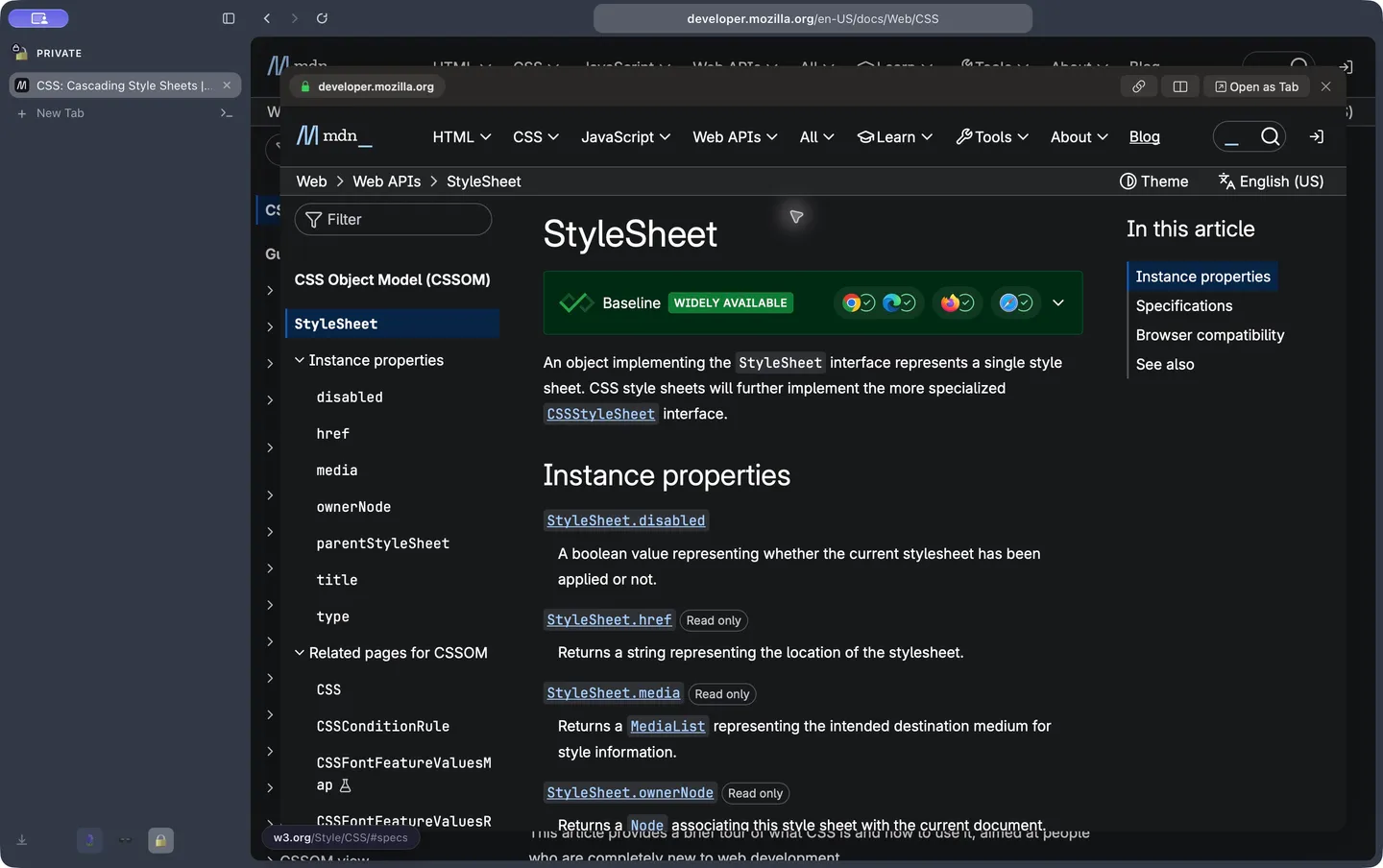
Lilo with a linked page open in Peek above the original page. The source tab stays selected in the sidebar.Lilo with a linked page open in Peek above the original page. The source tab stays selected in the sidebar.

Your call stays close.

For supported calls, mute your microphone, turn off your camera or leave from the sidebar. You can keep reading in another tab. During a call, ⇧⌘M mutes your microphone.

Hola. 你好. Olá. Привет.

Spanish, Simplified Chinese, Brazilian Portuguese and Russian now cover Lilo's interface, menus and dialogs. Shortcuts actions and emoji search are translated too.

All changes in this release

Added

  • Extensions can find printers and devices on the local network (chrome.mdns, chrome.system.network), rename downloads as they start (downloads.onDeterminingFilename), and send cookies with XMLHttpRequest as in Chrome
  • Try Peek, background tabs, Split View and Little windows from links in the website demo's local example pages.
  • A call card in the sidebar mutes the microphone, turns the camera off and leaves the call of a Meet-like tab from anywhere, and ⇧⌘M mutes the call's microphone during a call.
  • Record a performance session from Help > Diagnostics: Lilo saves a trace of its timings, hangs, dropped frames and per-process CPU, memory and energy to Downloads, ready to open in Perfetto or attach to a bug report.
  • Settings > Privacy > Browsing Data shows how much history, cookies, cache and site data the profile stores, and clears them; History > Clear Browsing Data… (⇧⌘⌫) opens it.
  • Use Lilo in Spanish, including the browser interface, native menus and dialogs, setup, Shortcuts and emoji search.
  • Use Lilo in Simplified Chinese, including menus, dialogs, system prompts, Shortcuts and emoji search.
  • Brazilian Portuguese across the browser interface, native menus and dialogs, system prompts, Shortcuts, and emoji search.
  • Add Russian across the browser interface, native menus and dialogs, system prompts, Shortcuts, and emoji search.
  • Settings > General > Search > Preload top hit starts loading a site you visit often while you type its address in a new tab, so Return shows it already loaded.
  • A new setting, Keep calls in the sidebar, under Settings > Audio and video: turn it off to send a call you leave to the floating window instead of the sidebar.

Changed

  • Simplify the website example pages with Space initials and plain labels instead of decorative emoji and arrow marks.
  • Polished the website demo with locally bundled profile artwork, Space icons and consistent preview controls.
  • Error pages show the error code, and for a rejected certificate the reason macOS gives with the certificates involved.
  • Refresh every website page with a shared layout, consistent installation controls, browser-language selection, and terminal and agent demos that replay while visible.
  • Lilo's built-in page scripts do a little less work in every frame, and reader mode no longer leaves anything a page can detect.
  • New windows open faster and use less memory: their sidebar and toolbar share one process.
  • Audio and video has its own page in Settings: picture-in-picture and autoplay under Playback, the microphone and devices under Calls.
  • Tab rows show playing sound and microphone, camera or screen capture as a badge on the favicon, click the sound badge to mute, and the close button no longer shifts the title. The call card can mute the call's sound, and the top and bottom tab strips open it from a microphone icon.
  • The browsing data settings show their sizes and sites faster, no longer waiting on Screen Time.
  • Extensions start faster at launch, no longer listing every installed font once each.
  • With extensions installed, the sidebar appears about half a second sooner at launch, and the first page always loads with their blockers active.

Fixed

  • Extensions whose pages wait for their background worker, such as MultiPassword, no longer show an empty popup when another extension started before them
  • An extension worker that answers a page on a port of its own, as Postman Interceptor does, now reaches that page when it is open in a tab
  • Extensions that clear their own data with browsingData no longer erase every site's cookies and storage
  • An extension update that asks for new access, such as debugger or proxy, waits for your approval before it installs
  • Extensions behave more like in Chrome: proxy sign-ins prompt at once when no extension answers, sockets keep their messages while idle, downloads land in the subfolders they name, idle detection reports a locked screen, and Stylus, Language Learning with Netflix and other extensions no longer fail at startup
  • Extensions that save encryption keys from their worker, such as 2FAS Auth, no longer freeze
  • Keep the website demo self-contained with interactive local example pages and centered preview windows.
  • Keep website demo link menus open after a right-click in WebKit, including repository folders.
  • Keeper's popup opens instead of loading forever, and so do other extensions that connect to their own pages without naming themselves
  • A tab moved out of an agent's folder fills the window again, instead of keeping the agent's page size and running past the window's edge.
  • Extensions behave more like in Chrome: aborted requests stop, cookies go only to their path, url filters ignore case, and a website can no longer pass itself off as another one to an extension's worker
  • Sidebar tooltips no longer hide under the docked picture in picture, and clicking Lilo in the Dock while the floating picture in picture shows on another app brings back the browser window.
  • Ad blockers with very large static rule lists (Pie Adblock) can update their rules again: the rules past WebKit's limit leave the compiled set instead of failing every update.
  • Control-D or exit in a terminal closes its tab instead of leaving it open on the ended shell
  • Middle-clicking a link opens it in a new background tab instead of navigating the current tab.
  • Ad blockers built on uBO Lite (Adblock Ad Blocker Pro and others) apply their rules again: a rule limited to some request methods no longer stops every other rule from loading, and their cosmetic filters turn on as in Chrome.
  • Submitting a form inside an embedded frame no longer clears the unsaved-changes warning of a form still being edited on the page.
  • A link opened in a background tab comes right after the current tab in Control-Tab, instead of last.
  • Extensions that follow a page's frames through webRequest (Dashlane) reach the frames of a page again: a frame's requests name it and its parent as Chrome does.
  • An extension's popup and other pages keep their connection to its background: Lilo relays these ports as Chrome does, so a popup no longer opens blank when WebKit dropped its port (Okta), and port messages are faster in bursts.
  • The sidebar's tab list no longer shifts sideways when its scrollbar appears.
  • With headphones on, calls get your full-quality microphone instead of the muffled, quieter voice WebKit's echo cancellation leaves. Settings > Audio and video turns it off.
  • An extension page that sends its tab to a website, through a link or a redirect, now opens that website instead of staying blank (RSS Feed Reader's options).
  • Extensions that message a page as soon as it loads (Requestly) now reach their content script, as in Chrome.
  • Content scripts can ask an event whether it has listeners (hasListeners), as in Chrome (Brisk Teaching).
  • Ad blockers that use session rules, like uBlock Origin Lite and AdGuard, no longer recompile all their filters at every launch, which took seconds of CPU.
  • Extensions get Chrome's wording for a disconnected port and for a page they may not script ("Attempting to use a disconnected port object", "Cannot access contents of the page"), which they test before reconnecting or asking for access.
  • Extensions get Chrome's wording for a missing tab or menu item ("No tab with id", "Receiving end does not exist"), which many test before retrying.
  • A content script runs once on a page its extension's host permission and its own matches both cover (RoEarn, RoSeal, TubeBuddy threw "Can't create duplicate variable"), the manifest an extension reads no longer lists Lilo's own content script (Lightning Autofill's options), and a content script's runtime.sendMessage and connect work detached (AdScrubber).
  • A content script file that several of an extension's manifest entries list runs once per page, as in Chrome (AdBlock's welcome page threw redeclaring its functions).
  • An extension that checks runtime.lastError through browser, as AdBlock does for its context menus, no longer gets "Unchecked runtime.lastError" errors reported against it.
  • action.setBadgeText takes no text, as in Chrome, where a tab's badge then shows the global text again (Jungle Scout).
  • An extension page closing as it sends a message no longer reports "Tab not found" errors, as Chrome runs nothing more of a closed page (Immersive Translate, Wappalyzer, Table Capture).
  • An extension with more static rules than WebKit applies keeps every rule of the rulesets its manifest turns on, which the rulesets it leaves off now give up first (AdGuard blocked no ads).
  • A page or content script that goes away while it waits on Lilo no longer fails its calls with "Lilo is unreachable", as Chrome settles nothing more of a closed page (LastPass logged each call a closing tab cut).

0.6.0

View on GitHub

Added

  • AI agents can wait for a text, an element or an enabled button to show on a page, and each click tells them what it landed on.
  • Tabs and bookmarks of messaging sites like Slack, Gmail or Google Chat show their unread count, or a dot when a page sent a notification you have not seen yet.

Fixed

  • AI agents can attach files on sites that hide their file picker under a button, such as X.
  • Quitting Lilo no longer signs you out of sites that save your sign-in as their page closes, such as Discord.
  • Dragging a tab onto a folder in the top or bottom tab strip no longer makes the strip jump under the pointer.
  • Text an agent types no longer reaches a page's keyboard shortcuts when no field has focus, and two conversations of the same agent app no longer share their tabs.
  • Agents see the buttons and fields of apps like X when they list a page's controls, find text drawn by web components, learn when you allowed an action, and get clearer messages when a page reloads under them or keeps changing.
  • Reordering folders in the top or bottom tab strip no longer leaves the drop spot stuck at the start of the row.
  • In the top or bottom tab strip, terminal tabs show their terminal icon and tabs slide into place as you reorder them, as in the sidebar.
  • Lilo no longer asks again to let an AI agent in after it is updated while the agent keeps running.
  • Dragging in the top or bottom tab strip shows the sidebar's section colors, so you can see whether a tab lands in favorites, pinned or today.
  • Sites that take a wide sidebar for open developer tools, such as Discord, no longer hide your sign-in while the sidebar is shown.
  • A tab Lilo unloads in the background keeps what its page saves as it closes, such as your Discord sign-in.
  • Video calls stay smooth after a page stops responding for a moment.
  • A video call keeps running when the lid closes while Lilo holds the Mac awake.

0.5.0

View on GitHub

Added

  • AI agents can insert long or multi-line text in one go, and a long agent call keeps sending progress, so the agent's app does not give up on it.

Fixed

  • AI agents now type text exactly as written, without your Mac's smart quotes or dashes, and Lilo asks you before an agent posts or replies on a site. A click from an agent also waits for the request it starts, so a post or payment is not cut off when the agent moves on.
  • Text an agent types with line breaks no longer lands out of order in editors such as X's, an agent's tab shown at a size the agent set no longer lets its other pages show around it, and an agent restarted through Claude Desktop keeps its tabs.
  • Full-page screenshots of sites that keep an invisible frame the size of the window, such as LinkedIn, now capture the whole page.

0.4.1

View on GitHub

Changed

  • The website now includes the interactive Lilo interface with its real app icons, native menus and settings, a feature explorer, local browser and terminal examples, and a Codex demo that controls sample pages through MCP with visible actions and approval prompts. Saved tabs, split views, keyboard customization and profile controls follow the Mac app.
  • Cross-site tracking prevention is on by default, as in Safari: sites embedded in others can't follow you from site to site.
  • Pages that tell the browser which page comes next (link prefetch) now get it loaded ahead, so following that link opens it at once.

Fixed

  • With tracking prevention on, sites you keep using, such as Google and YouTube, no longer sign you out after a while.
  • Lilo no longer quits when an extension runs a script in a tab that was just put to sleep.

0.4.0

View on GitHub

Added

  • Agents learn when a failed click, Enter or write request may already have reached the site, so they check before trying again instead of doing it twice
  • A page the content blocker stops from loading offers Visit Anyway, which loads it once without blocking, in place of Try Again

Changed

  • Lilo checks for and downloads updates on its own, then offers a Restart card at the bottom of the sidebar (an icon in a top or bottom tab bar) instead of an alert; ignored, the update installs when Lilo quits

Fixed

  • Importing from Arc puts each profile's Favorites in every one of its spaces, and no longer loses them when a space has the same name as its profile

0.3.3

View on GitHub

Changed

  • Each agent works in its own profile, in an Agents space per profile: one agent switching profile no longer moves the other agents' tabs, and the Agents space menu no longer has a profile picker.
  • An agent's permission prompt puts Deny beside Allow Once, with Always Allow on its own row above.

Fixed

  • An active pinned or favorite tab on a tab strip no longer covers the tabs beside it.
  • An agent whose MCP server restarts keeps its tabs, and a tab that closed with its conversation says why.
  • A long agent script or profile switch is no longer cut off after 90 seconds as if Lilo were frozen.
  • The command bar no longer puts a locked folder above the web search when a query only matches scattered letters of one of its tabs, and a folder named with an emoji shows that emoji as its icon.
  • Clicking a docked call or video from another space goes back to its space and tab, instead of hiding it.
  • Links on image-heavy pages like Mobbin open right away again, instead of sometimes taking up to a minute while the content blocker kept the page busy.

0.3.2

View on GitHub

Fixed

  • The Check now button sits beside Lilo's version in Settings again, instead of stretching across the row below it.
  • Moving the tabs from the sidebar to the top or the bottom no longer leaves the new tab bar deaf to clicks and hovers until the window is resized.
  • With many tabs on a tab strip, squeezed tabs no longer slide under the Settings tab: the row scrolls instead.

0.3.1

View on GitHub

Added

  • The AI agents step of the setup copies Lilo's configuration for any other MCP agent, as Settings does.

Fixed

  • The address bar keeps its height when its site controls button shows up, as when a site uses the camera or microphone.

0.3.0

View on GitHub

Added

  • Seven clicks on Lilo's version row in Settings add Lilo's own developer tools to the Develop menu, such as its chrome's devtools.

Changed

  • With the tabs on top or at the bottom, Settings opens as a page: its sections sit beside the content in one card, and the tab strip shows an active Settings tab that closes it.

0.2.4

View on GitHub

Fixed

  • Moving the tabs to another edge no longer leaves the tab bar frozen or unclickable until Lilo restarts.
  • A permission prompt opened from the address above the page hangs down into the page instead of rising off the top of the window.
  • An agent you allowed is no longer asked again after Lilo updates while the agent keeps its connection helper running.

0.2.3

View on GitHub

Fixed

  • Extension icons fill their spot in the toolbar and the extensions list again, instead of showing at a quarter of their size in one corner.
  • On a tab strip, every tab scrolls as one row, pinned and favorite ones too, and a pill squeezed to its icon no longer shows a stray close button over its neighbor.

0.2.2

View on GitHub

Fixed

  • An extension's items show once in a page's context menu, not twice.
  • The badge of a tab an agent controls stays in view when the window is narrower than the agent's viewport.
  • Extensions that talk to each other through a port, such as companion extensions starting together, no longer wait forever for an extension that is not ready, and no longer lose the first messages on a fresh connection.
  • An extension page or worker no longer sometimes stops hearing its events, or waits forever on its calls, when it opens at the same time as another part of the extension.
  • A content script's port to another extension no longer hands that extension a stray internal message now and then.
  • An extension's first notification no longer leaves the extension waiting until you answer macOS's permission prompt.
  • An extension disabled, updated or removed just as its popup opens no longer makes Lilo crash later.

0.2.1

View on GitHub

Fixed

  • A page opened from a peek as a tab now keeps its favicon.
  • Replaying the onboarding no longer changes the icon of your current Space.
  • An AI agent app that Lilo had once asked about, and that reconnects at each try like Claude's local agent mode, is asked again instead of being refused without a prompt until Lilo restarts.

0.2.0

View on GitHub

Added

  • When a page cannot load because the connection timed out, dropped or is offline, the error page offers Show Saved Copy, to read the version Lilo last kept of it.
  • Downloads cut off by the network resume on their own from where they stopped, up to three times, instead of waiting for Retry.
  • Extensions can message one another, and VPN extensions can answer a proxy's sign-in, as in Chrome.
  • Typing the start of a site you visit completes it inline in the command bar, and Return goes there; Fn-Delete drops the completion.
  • Pinned tabs and bookmarks have an Edit... item that changes their name and the address they open, for a site that redirects elsewhere; Use Current Page replaces Set as Pinned Page.
  • A Space's color can follow the time of day, the page you're on or your wallpaper, chosen in the Space editor and during onboarding.
  • Put your tabs on any edge of the window: left, right, top or bottom, with the address with the tabs or above the page. Pick it in Settings, during the setup, from the command bar, or by holding the sidebar's top and dragging it to an edge.
  • Extensions can message other extensions from their content scripts, and reach their own pages open in a tab.

Changed

  • The website now includes release notes for every published version.
  • On Low Data Mode networks, Lilo no longer refreshes its content blocking lists or checks for extension updates in the background, and these refreshes give way to the pages you load.
  • Favicons load the smallest icon that looks sharp instead of the largest one, so a site's icon costs less on a slow connection.
  • Viewing a page's source shows what the tab loaded, instead of downloading the page again.
  • Extensions start faster and cost less while idle: Lilo prepares an extension again only when it or Lilo changed, opens restored extensions together, loads only the APIs an extension may use, wakes a stopped extension only for what it listens to, and reports each tab change once.
  • Extension updates are checked once for every profile, and each new version downloads once.
  • An unpacked extension loads from a copy that follows its folder, so Lilo no longer writes into the developer's files.
  • The website has simpler navigation, a theme toggle and a new footer with GitHub and Discord icons. Space transitions are animated and the preview also works without JavaScript. Extension links open the Chrome Web Store. Text contrast and keyboard access are improved.
  • Each space is its own window to extensions, so switching spaces no longer hides the other spaces' tabs from them, and a window an extension opens is its own floating window, which it can close without touching yours.
  • Extensions start faster and answer sooner: less code loads in their background, tab queries take one round trip, and bursts of storage writes go out together.
  • Ad blockers that turn off some of their rules no longer make Lilo prepare them again at the next launch.

Fixed

  • A page that times out or whose server name gets no answer is tried again once on its own, and a page left on an error reloads when you switch networks, such as from Wi-Fi to your phone's connection, not only when you come back online. A mistyped address still shows its error right away.
  • Try Again on a form that failed to send no longer opens its address without what you filled in: it reloads the page the form was on.
  • Search suggestions show while you type on a slow connection, instead of only once you stop typing.
  • A favicon that loads too slowly no longer leaves the site without an icon for ten minutes.
  • When the extension update service cannot be reached, Lilo checks again 30 minutes later instead of 5 hours later.
  • An extension without access to private spaces can no longer reach a private tab.
  • Extensions see every open tab, including those not loaded yet, with the tab group, the tab that opened it and when it was last used, as in Chrome.
  • Extensions that check whether a page already runs their script, then inject it (translators, screenshot and SEO tools), work again, and ad blockers that register their scripts at run time get the same compatibility as the others.
  • Tab groups, history and downloads changes you make reach your extensions, and a download's events reach the extensions of its own profile.
  • A tab whose page never loaded, such as a localhost server that was down, shows the error page after a relaunch instead of staying blank.
  • The import step of onboarding no longer offers a browser you uninstalled because of the data it left behind.
  • The ad blocking icon in onboarding stands out more against its tile.
  • Dragging a tab from the sidebar onto the page to open it in split view no longer switches to the next Space.
  • A Space's tooltip no longer repeats its name when its profile has the same one.
  • In Settings, an agent app Lilo is set up in but that never connected reads Configured, instead of a Set up label that looked like a disabled button.
  • Sites show fewer captchas: pages no longer see any trace of Lilo's own web APIs, the user agent states Safari's exact version, and the content blocker lets bot-defense scripts through.
  • A right-click no longer leaves a tooltip on screen under the context menu.
  • Claude artifacts and other embedded apps that sign in with their own cookies now open, instead of saying the browser isn't supported.
  • The site details card under the address bar shows in full over the page when the sidebar is narrow, instead of being cut off at the sidebar's edge.
  • The custom color swatch in the Space editor keeps its color wheel once a custom color is picked, so it still reads as the way to pick another.
  • The command bar no longer lists an open tab whose title only holds the typed letters scattered apart, so a long search goes to the web instead of switching to an unrelated tab.
  • Dropping a tab on the left or right of the page opens it in a split view again, instead of doing nothing.
  • Extensions no longer keep Lilo and its web processes busy after launch: restored tabs are seen by extensions again, so their scripts stop retrying in a loop.
  • Dashlane's toolbar popup no longer shows an empty vault while the window shows a terminal or another page that is not a website, and extensions that reapply the same blocking rules at each start no longer make Lilo rebuild them.
  • Proton Pass fills a login when you pick it in its menu under a field.
  • Lilo no longer quits when an extension opens a window just as it appears.
  • More Chrome extensions load and run as in Chrome, among them Axure RP, Octotree, Table Capture, Mailvelope and Microsoft Solitaire.
  • Extension popups that read their settings when they open, such as Markdown Reader's, show them instead of opening empty.
  • Extensions that check the network connection type, such as Lightspeed Insight Agent, start again, and extensions reading managed settings with defaults get those defaults.

0.1.5

View on GitHub

Changed

  • Settings for AI agents, the terminal's sleep and content blocking are clearer: no indented rows, one choice for when the Mac stays awake, statuses as badges, and always-allowed sites as chips you remove in one click.
  • Settings name the password manager you already use, with a Change button, instead of always offering to add one.
  • The passwords step of the setup shows each password manager's own icon instead of its initial.
  • Allow access on a browser macOS protects, such as Safari, opens Full Disk Access with a small Lilo panel beside it: turn Lilo on, or drag its icon into the list. Once access is granted, Lilo comes back and the browser is ready to import.

Fixed

  • Command bar results no longer show a site's initial through its favicon's transparent parts.
  • Switching spaces no longer crops the start of the address while it fades in.
  • Imported tabs, bookmarks and Arc spaces show their sites' icons right away, instead of an initial until each is opened.
  • Importing no longer offers browsers that are not installed, whose folders password managers create for their helpers, and finds the icon of a Beta, Dev or Nightly browser or one installed outside LaunchServices.
  • The Agents space no longer shows in Settings > Spaces, link rules, the external links setting or Move to Space, and no longer counts as a space of yours, so your last space cannot be deleted.
  • Proton Pass's popup opens at its full size again, instead of a thin strip that changed width as you typed.
  • Extensions that read your session on a site they work with, such as ChatGPT's side panel, see that you are signed in.
  • Extensions whose package carries unusual file permissions, such as ClickUp and Linkclump Plus, install from the Chrome Web Store.
  • Extensions with an empty description, icon list or page override in their manifest, such as BLACKBOX.AI, Genesys Cloud and Twitch Adblock, load without errors.
  • Dark Mode - Night Eye saves its settings again.
  • Extensions that look for new tab pages among your tabs, such as J2TEAM Security, find them.

0.1.4

View on GitHub

Changed

  • The setup asks how you will use Lilo with a third choice between browsing and developing: with your AI agents, which turns them on and walks you through connecting them, without the terminal.
  • The passwords step of the setup lists one password manager per row, so each description reads on one line.
  • In the setup, Use Lilo is a secondary button: Continue stays the one main action.

Fixed

  • A permission request, such as an AI agent asking to connect, slides a hidden sidebar out so it can be answered, and an agent's connection request waits ten minutes instead of two.
  • A Space without pinned tabs no longer leaves an empty band between its name and its tabs.
  • An AI agent that reconnects while you are on your way to answer, as Claude Desktop's local agent mode does, is no longer refused behind your back: its request stays up, and once you allow it, its next connection is let in.
  • An AI agent whose app macOS will not let Lilo identify is asked about instead of refused without a word; its approval lasts until it disconnects.
  • Setting Lilo as the default browser no longer reports a failure after you accept macOS's prompt.
  • An app downloaded with Lilo no longer opens on "(null) downloaded this file": macOS names Lilo as where it came from.
  • Extensions an import reinstalls open their welcome pages in the background, instead of taking the window and the keyboard from the setup.
  • The welcome after an import names what came over (bookmarks, open tabs, history and extensions), not only the pages of history.
  • The setup's welcome screen names the Return key, as on a Mac.

0.1.3

View on GitHub

Added

  • Lilo offers to move itself to Applications when it runs from the disk image, then relaunches from there and ejects the disk image.
  • Pin any number of extensions: the ones that do not fit in the address bar fold into the extensions menu.
  • An extension's details link to its Chrome Web Store page.
  • Importing from Chrome pins the extensions Chrome had pinned, in its toolbar order.
  • Settings > Extensions has a profile picker, to see and manage the extensions of any profile from any window.
  • Saving a capture asks where to save it when downloads do.
  • AI agents can mock requests by their body, such as one GraphQL operation, and replace text on a page to anonymize it, with a guard that refuses a screenshot while a forbidden name still shows.
  • AI agents can screenshot the whole page, lazy content and inner scrollers included, or one element with a margin, at the screen's full resolution, and save it to a file.
  • Shift Command 2 captures a selected area of the page.
  • The emoji picker of a space searches and names emoji in the browser's language.
  • Rename a pinned tab from its menu or by double-clicking its title: the name stays across page title changes, navigations and relaunches, and an empty name brings the page title back.
  • A pinned tab away from its page shows a slash and the page it is on after its name; clicking its icon takes it back, and Set as Pinned Page makes the current page its new one.

Fixed

  • Extensions such as Okta no longer ask for access on every page of the sites they declare, and a request never shows a page's full address.
  • The Claude extension signs in: claude.ai can hand it the sign-in code again.
  • Adblock Plus blocks again, extensions whose messaging rules name a hosting domain install, and FireShot captures the page.
  • A crash when an extension scripts a tab at the moment Lilo puts it to sleep.
  • The site details card fits a narrow sidebar and shows while a permission request waits.
  • Full screen: no more white band at the top, and the sidebar shows whole or stays hidden, as its setting says.
  • AI agents no longer time out while Lilo waits for you to allow them: they are told to ask you.
  • An agent asking to connect is no longer hidden behind an extension's permission request.
  • The Chrome Web Store no longer asks you to switch to Chrome.
  • A disabled extension keeps its logo, and logos no longer sit on a colored tile in Settings.
  • The space editor's color picker and eyedropper work on the first try.
  • Removing a pinned tab or a bookmark can be undone from the toast, with Command Z from the sidebar, or with Reopen Closed Tab: it comes back where it was, with its name.
  • Importing a browser's second profile installs its extensions into that profile, not only the profile on screen.
  • Opening profile management from the space editor keeps the space's unsaved edits, and its footer wraps in a narrow window.
  • Light accent colors keep white labels readable.
  • The import lists browsers macOS does not let Lilo read, with how to grant access.
  • Update checks always fetch the latest release.
  • Onboarding: a double click no longer skips a step, the import step has a Back button, and each step puts the keyboard on its main button rather than on an extension to install or a setting to toggle.
  • Onboarding: the arrow keys move between the usage and theme choices, the welcome screen keeps VoiceOver out of the window behind it, the welcome toast is spoken, and each Connect button names its app.
  • Onboarding: the welcome screen's petals turn into your first space's icon.
  • Onboarding: the import keeps "Choose what to import" in view in a small window, and the Full Disk Access link lines up when it wraps.

0.1.2

View on GitHub

Added

  • A colored icon on every settings group.
  • AI agents: Connect shows its progress until Lilo answers.

Fixed

  • A crash when an extension injects a script into a tab Lilo had put to sleep, common right after importing extensions from Chrome.

0.1.1

View on GitHub

Fixed

  • Update checks: 0.1.0 could not start its updater ("Unable to check for updates"). If you installed 0.1.0, replace it once with this version; later versions arrive on their own.

0.1.0

View on GitHub

First public release: a native macOS browser for people who live in a sidebar, with Spaces that keep their own sign-ins, Chrome Web Store extensions, terminal tabs, and an Arc import. Requires macOS 26 or later.

Open source, for good.

Read it, fork it, change the sidebar in Svelte and rebuild in seconds. Your browser stays yours.